COMPLETE SOUNDS BUNDLE · 1037 PLAY + 1055 PLAY · both for €14.90 · until Nov 30 → Get the bundleSound Bundle 1037 + 1055 · both €14.90 →

BETA · macOS · BY NOIXIM AUDIO

You play. The machine computes.

SONIQ AI turns your videos into music, motion and light — locally on your Mac. One click for the whole dramaturgy, one key for every effect.

Free beta · macOS · Apple Silicon · 0.9.1-beta

IN ONE MINUTE

SONIQ AI explained

From import to export: everything important in one minute.

Also available in German and Spanish — switch the language at the top.

THE IDEA

Human creativity. Machine precision. One world of music and image.

YOU

  • the idea
  • the feeling
  • the timing
  • the choice

SONIQ AI

  • finds people and faces
  • measures depth and camera motion
  • puts every cut on the beat
  • renders effect and sound in sync

Not as much as possible. Not artificially little. Only what keeps the creative flow going.

Philosophy of NOIXIM AUDIO

WHAT IT DOES

Six ways from raw video to a finished clip

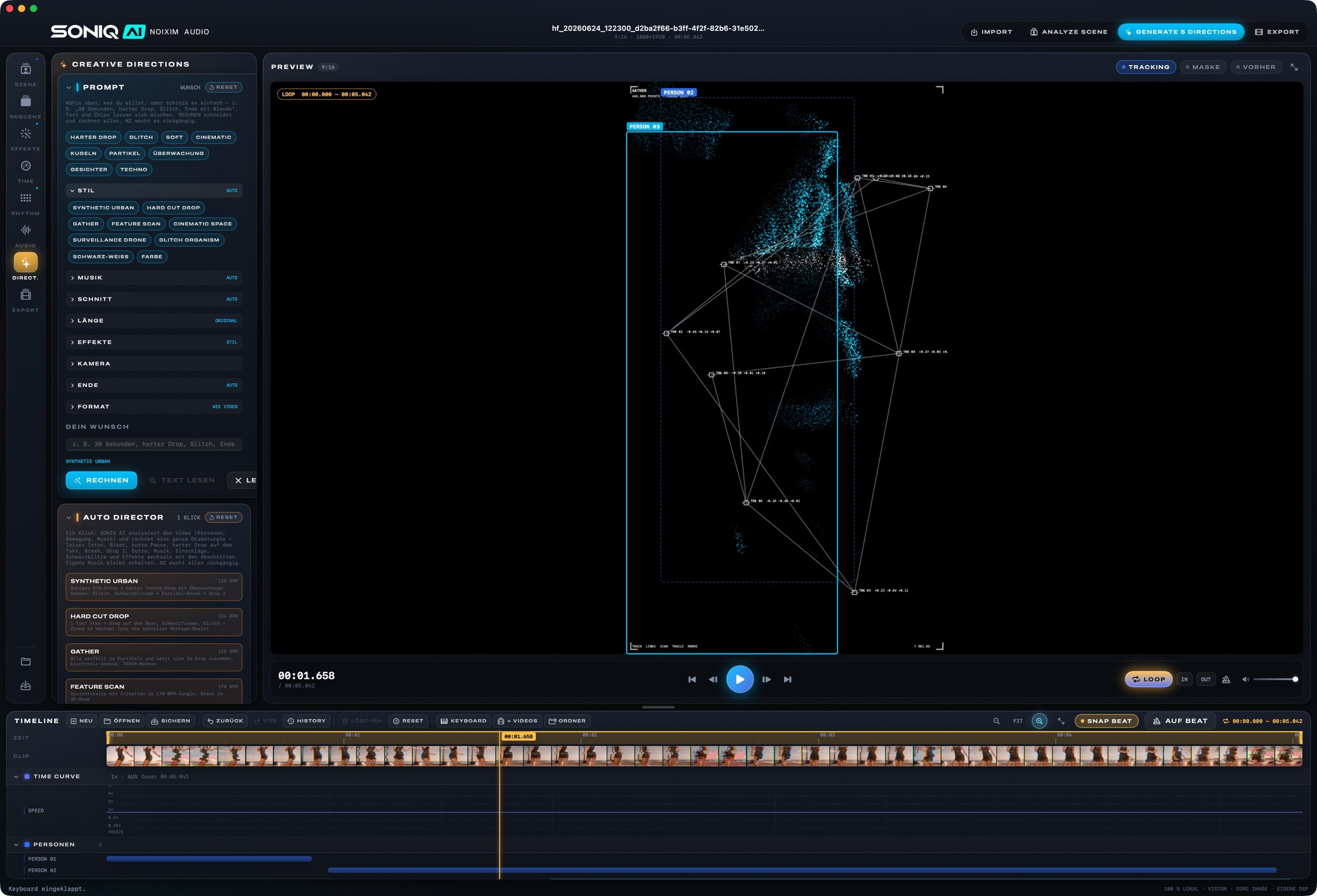
AUTO DIRECTOR

A whole dramaturgy in one click

Intro, build-up, a short silence, a hard drop on the bar, break, second drop, outro. Music, impacts, risers and black flash frames are computed for your video.

7 styles · from Synthetic Urban to Glitch Organism

PROMPT

Say what you want

“30 seconds, hard drop, glitch, fade to black.” SONIQ AI finds the best part of the video, cuts to the beat and renders everything. Or pick style, music, cut, length and ending as chips.

English, German, Spanish keywords · one undo step

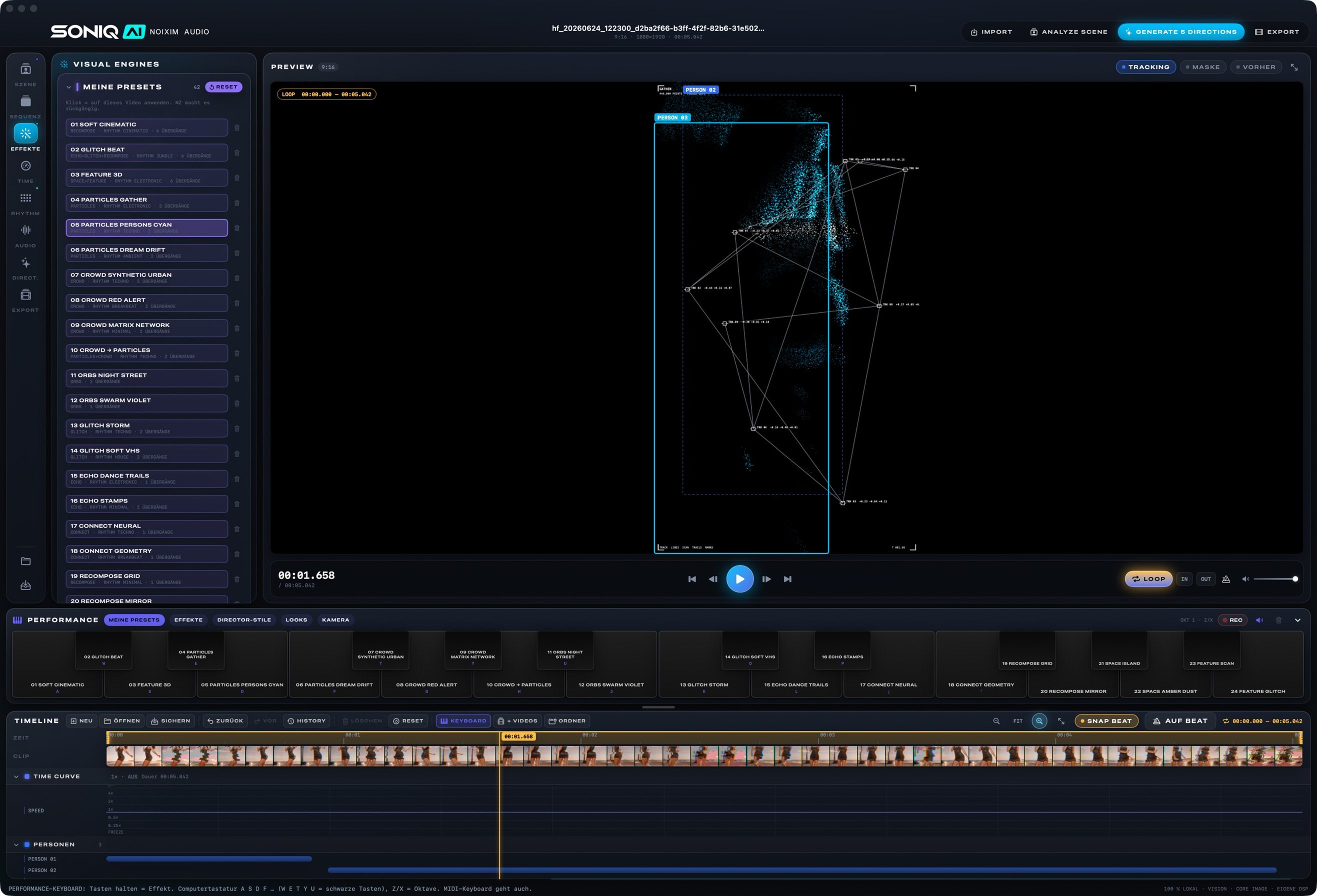
PERFORMANCE KEYBOARD

Every key is a look

Two octaves, glowing violet when pressed. Hold a key and the video changes instantly, with sound. Press REC and your performance becomes a track in the timeline.

Mouse · computer keys · MIDI keyboard

11 VISUAL ENGINES

Effects that understand the scene

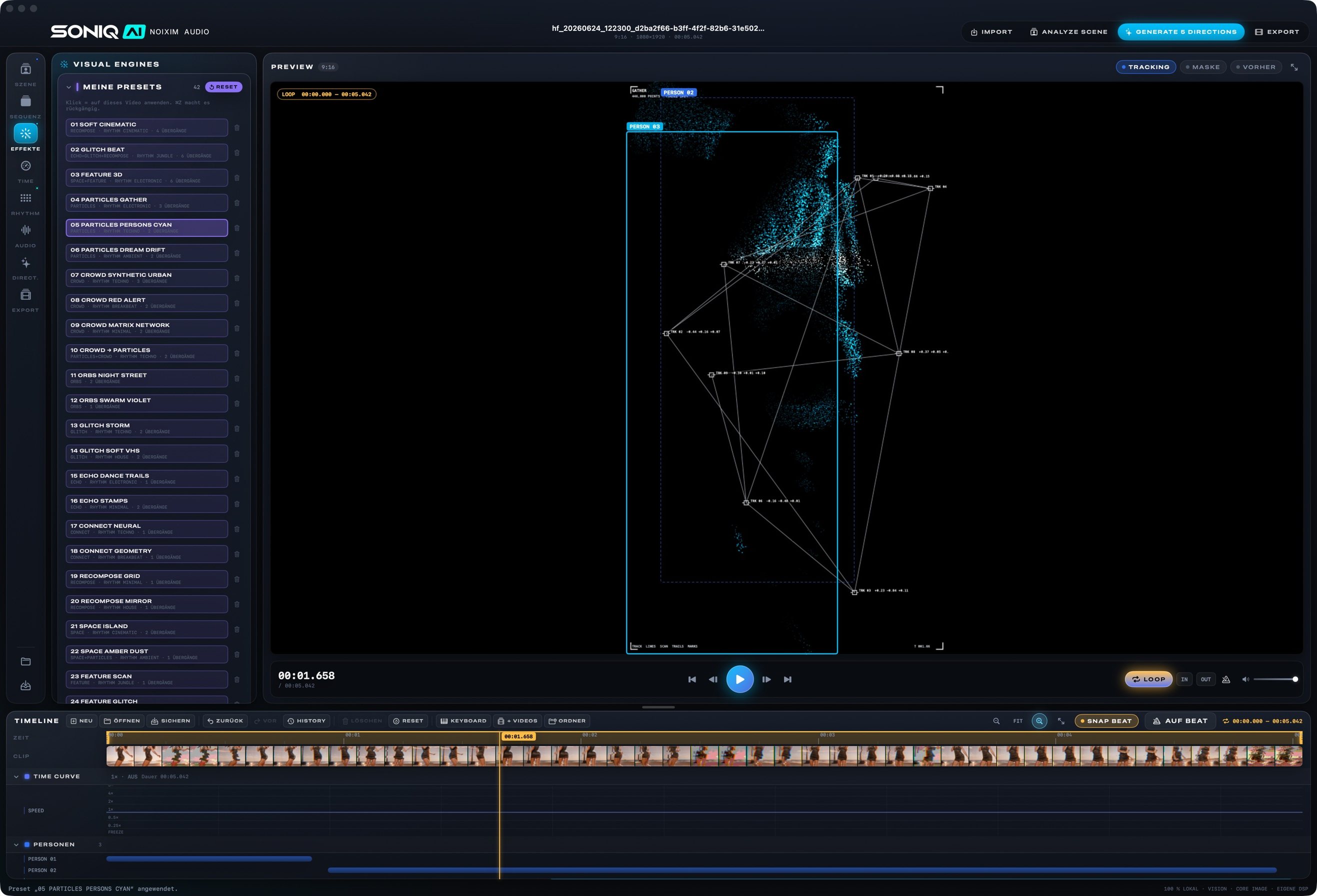
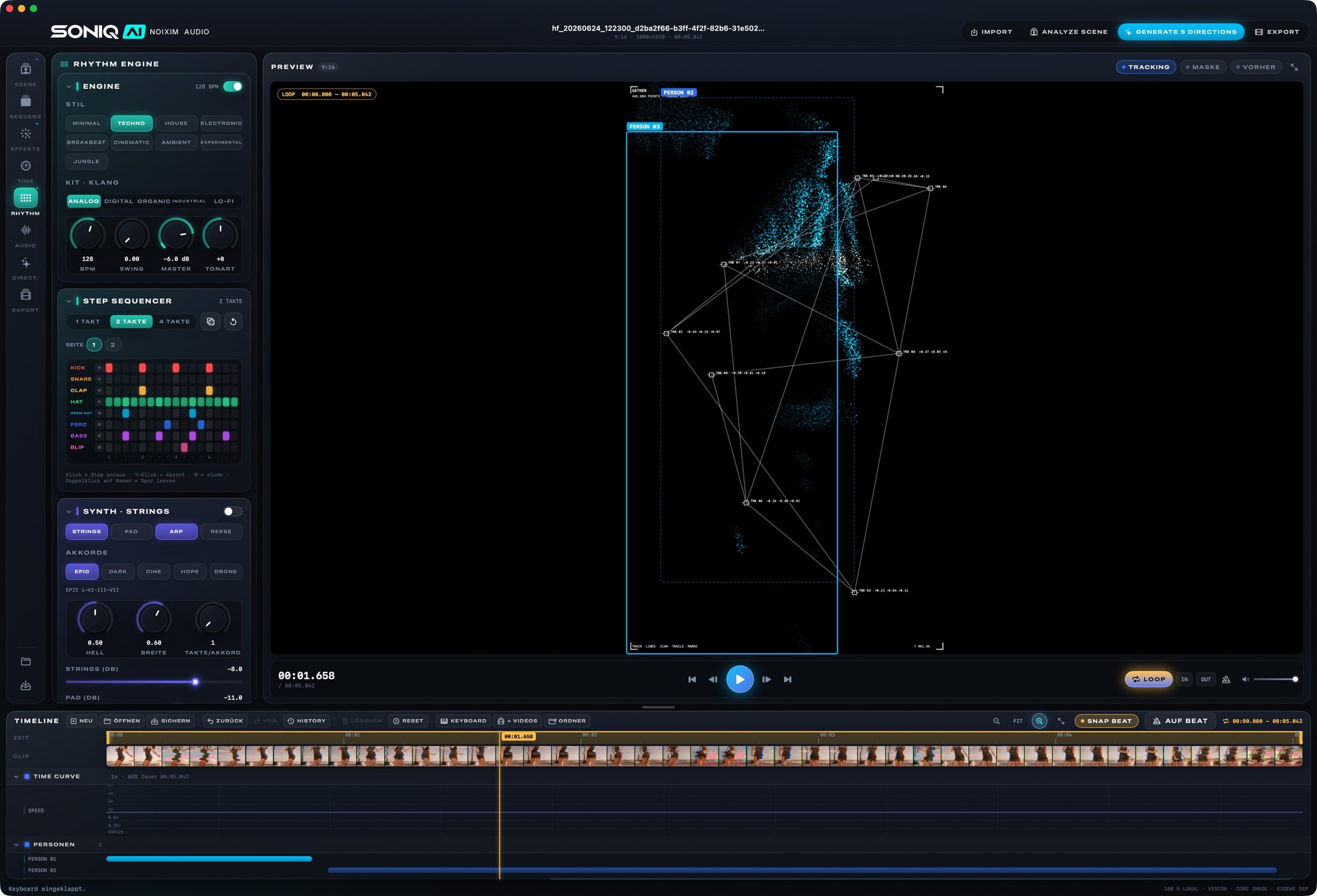
People are cut out, faces labelled, the scene turns into particles or a 3D island, glowing orbs stand on the street, and a virtual camera orbits, follows or flies over the scene.

Apple Vision · Core Image · Metal

NOIXIM SOUND

Music from real instruments

The director music can play through the NOIXIM instruments 1037, 1055 and NOIXIM MOTION when they are installed on your Mac — or through the built-in synth.

chords · bass · arp · drums

EDITING

Works like a studio

Tracks, transitions, folders as compositions, right-click menus, delete key, full history and a RESET back to the original video.

nothing is lost — ⌘Z restores every step

The engines

  1. 01 ISOLATE
  2. 02 CONNECT
  3. 03 MOTION ECHO
  4. 04 GLITCH
  5. 05 RECOMPOSE
  6. 06 SPACE 3D
  7. 07 FEATURE TRACK
  8. 08 PARTICLES
  9. 09 CROWD NETWORK
  10. 10 ORBS
  11. 11 CAMERA

PERFORMANCE KEYBOARD

Play your video like an instrument

Open the keyboard with ⌘K below the preview. Two octaves, 24 keys. Hold a key and the picture changes instantly, with sound; release it and the video returns. Five banks change what the keys do.

The performance keyboard in SONIQ AI with glowing violet keys

The five banks

MY PRESETS36 keys

Every key is a complete look: engine, colours and timing, from Soft Cinematic to Acid Rave.

EFFECTS10 keys

One engine per key: Glitch, Echo, Space 3D, Particles, Network, Orbs, Camera, Connect, Recompose, Feature.

DIRECTOR STYLES7 keys

The drop look of each AUTO DIRECTOR style — Synthetic Urban, Hard Cut Drop, Gather and more.

LOOKS8 keys

Fast picture looks without analysis: B/W, Strobe, Hard B/W, Glitch Max, Echo, Particles, Network, Orbs.

CAMERA8 keys

Virtual camera moves with real depth: Orbit, Follow, Snorricam, Dolly Zoom, Push In, Pull Out, Handheld, Top Down.

How to play

  • Mouse: click or hold a key
  • Computer keys A W S E D F T G Y H U J …, Z / X switch the octave
  • MIDI keyboard: plug in and play
  • REC: your playing is recorded as its own track and exported exactly like that
  • Speaker button: sound on every hit on or off · bin: delete the recording

HOW IT WORKS

From raw footage to a finished clip

SONIQ AI is one app for image, motion and sound. You decide what it should feel like — the app does the work frame by frame.

01 · IMPORT

Bring in your footage

Drag one video, several clips or a whole folder into the window. Several videos become a sequence with tracks; folders become compositions you can open and edit.

  • MP4, MOV, HEVC and photos
  • vertical, square or wide
  • your originals are never changed

02 · ANALYSIS

The app understands the scene

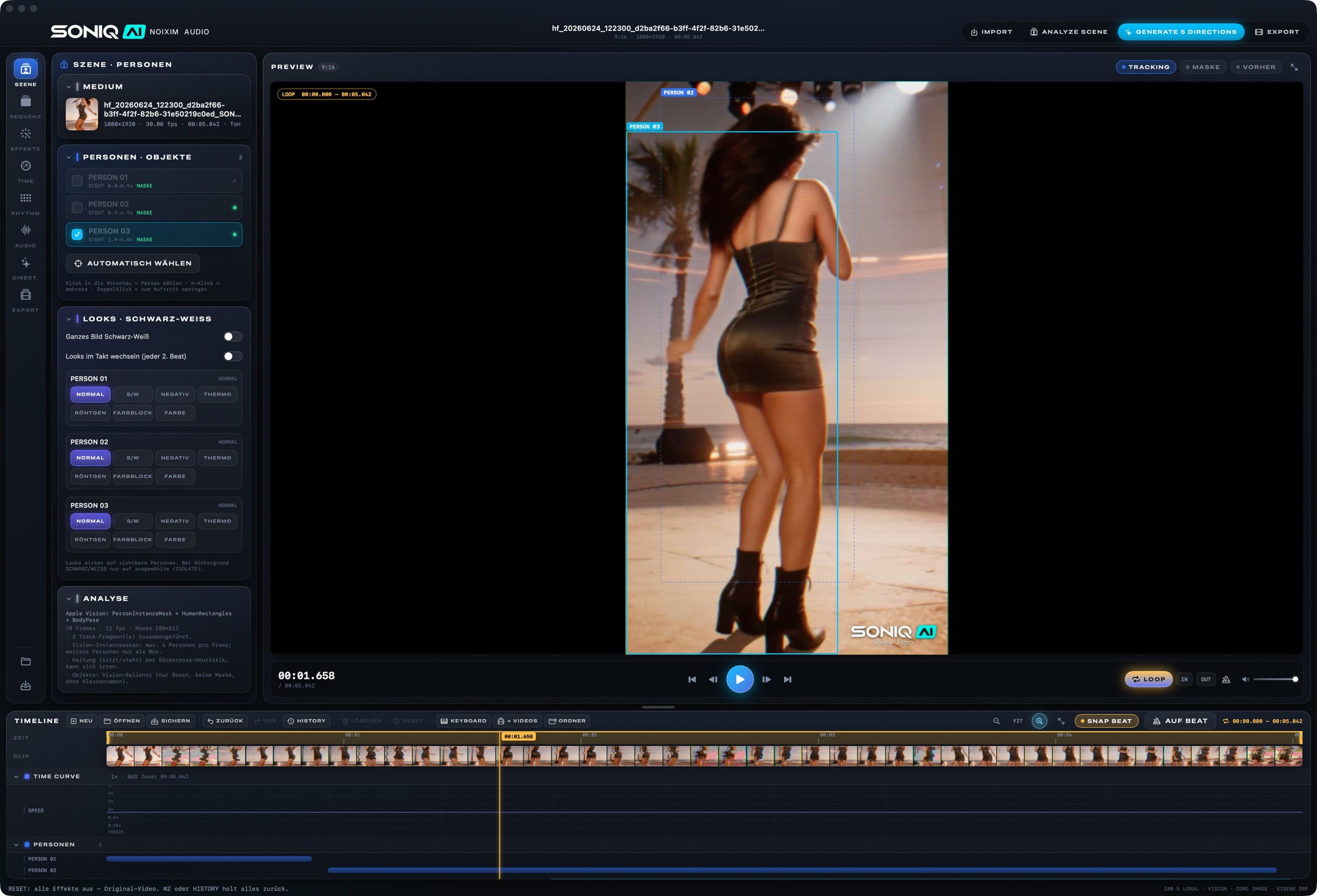
On your Mac, SONIQ AI finds the people and their outlines, measures depth, recognises faces and follows the camera. This is what lets effects stick to people and stand on the street.

  • people, masks, faces
  • depth and camera motion
  • progress line from 0 to 100 %
SONIQ AI: people detected and masked in the scene

03 · DIRECT

Choose a direction

Press one AUTO DIRECTOR style, write a prompt, pick one of 36 factory presets — or play the looks live on the performance keyboard. Every decision is one undo step.

  • 7 director styles
  • prompt: “30 seconds, hard drop, glitch”
  • 36 factory presets
  • keyboard: every key a look, with sound, REC
Hard Cut Drop style with green surveillance frames

04 · ENGINES

Eleven visual engines

Isolate, Connect, Motion Echo, Glitch, Recompose, Space 3D, Feature Track, Particles, Crowd Network, Orbs and Camera. They can be combined, timed on the beat and switched per section.

  • people as particles or 3D island
  • glowing orbs with shadows on the street
  • surveillance frames, networks, labels
Space 3D: the scene as a floating island

05 · MUSIC & SOUND

Music that fits the cut

Keep your own track — impacts, risers and the drop land on its beat. Or let SONIQ AI create music for the style: quiet intro, short silence, hard drop. With the NOIXIM instruments 1037, 1055 or NOIXIM MOTION installed, the music plays through them.

  • own music stays
  • drums, bass, chords, arp per section
  • impacts, risers, glitch sounds
Rhythm engine with step sequencer and synth

06 · EDIT & EXPORT

Fine-tune and export

Timeline with tracks, 14 transitions, history, right-click menus and a RESET back to the original. Export as MP4 with sound in 9:16, 1:1 or 16:9.

  • works like an editing app
  • history: jump back to any step
  • export with sound, frame-accurate

PRIVATE BY DESIGN

100 % local

No cloud, no upload, no account for the analysis. Your footage stays on your drive and your originals are never changed.

  • Apple Vision for people, faces and camera
  • Core Image and Metal for the effects
  • own DSP for music and sound
  • runs offline

OUR GOAL

A creative partner, not a filter

We build SONIQ AI so that a single person can make music videos, reels and visuals that used to need a team: an editor, a motion designer and a sound designer.

The idea stays human. The machine does the patient work — finding people, measuring space, placing every cut on the beat — and does it on your own computer, without sending your footage anywhere.

  1. NOW

    Public beta

    The complete app for macOS. Exports carry the SONIQ AI logo.

  2. NEXT

    Version 1.0

    Without watermark, with your own presets — and everything we learn from your beta videos.

  3. PLANNED

    Free prompts with local AI

    Optional local language model for longer wishes — still without cloud.

  4. PLANNED

    Live performance

    Play looks and music together with a MIDI keyboard, like an instrument.

DOWNLOAD

SONIQ AI beta is available

Free during the beta. Every export carries the SONIQ AI logo in the bottom right corner. Saving your own presets comes with the full version.

Free · enter your e-mail and get the download link · Version 0.9.1-beta · installer (.pkg), signed and notarized by Apple

  • Mac with Apple Silicon (M1 or newer)
  • macOS 14 Sonoma or newer
  • 8 GB RAM, 16 GB recommended
  • optional: NOIXIM 1037 / 1055 / MOTION for the music

Install in three steps

  1. Open the downloaded .pkg file.
  2. Follow the installer — SONIQ AI is placed in Applications.
  3. Start SONIQ AI and drag a video into the window.

Feedback and bugs: support@noixim.com — every message helps shape version 1.0.

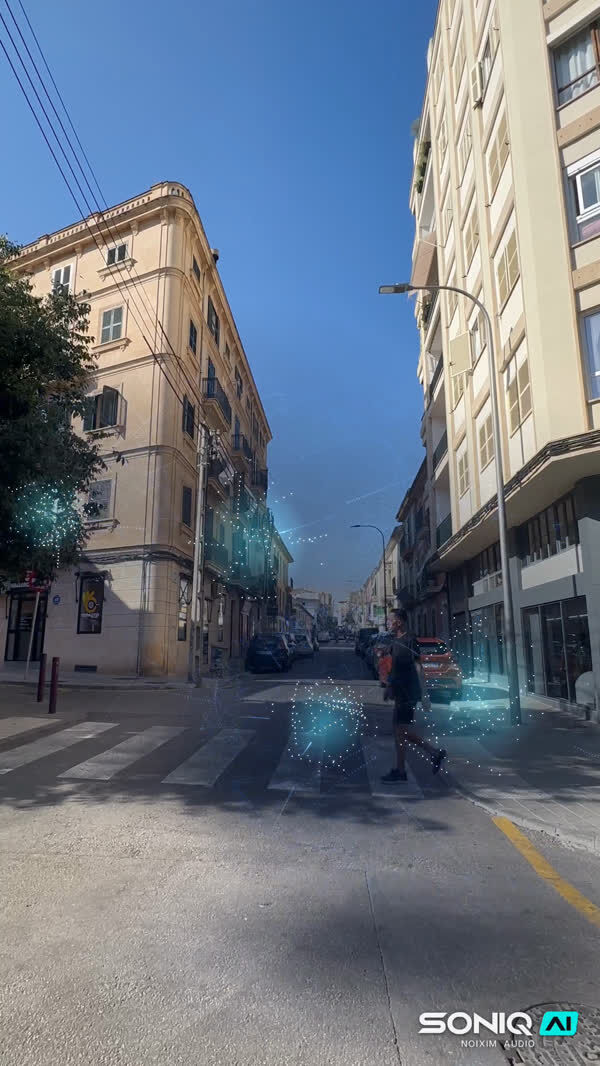
SONIQ AI export
Every export of the beta carries the SONIQ AI logo in the bottom right corner — each video becomes an invitation.

FAQ

Questions

Does the beta cost anything?

No. The beta is free: all engines, the keyboard and all 36 factory presets. Exports carry the SONIQ AI logo in the bottom right corner; saving your own presets comes with the full version.

Do my videos leave my computer?

No. Analysis, effects, music and export run locally on your Mac. No upload, no cloud, no account needed.

Do I need the NOIXIM instruments?

No. SONIQ AI has its own sound engine. If 1037, 1055 or NOIXIM MOTION are installed, you can let the music play through them.

Is there a Windows version?

Not at the moment. SONIQ AI is built on Apple technologies (Metal, Vision, Core Image) and runs on macOS.

Can I use my own music?

Yes. Your track stays; SONIQ AI places impacts, risers and the drop on its beat.

Which video formats work?

MP4, MOV and HEVC from phones and cameras, as well as photos. Export as MP4 in 9:16, 1:1 or 16:9.